

NOTES: for Developers / Programmers
Project: Rules-Training.com
Project Purpose:
To create an educational / instructional website – www.Rules-Training.com – where subscribing sports officials, coaches, players and/or fans can review actual game situations for any sport (using a quiz format, multiple choice or True/False questions) for the purpose of learning the rules of that sport.
How the site will work:
There are two main features of the site, Interactive Rules Review and Quiz/Test Creation.
Using the Interactive Rules Review feature of the site, the user will review a question (game situation) online and select an appropriate answer. Once an answer is selected, the user will receive immediate feedback as to the correctness of the answer and a detailed explanation of the rule governing the situation (using the modified Rapid Quiz plugin).
The Quiz/Test feature is designed to be used by those individuals who train sports officials (ie Rules Interpreters and Class Instructors) to create printable quizzes to be distributed to their association members or students.
The database of questions / game situations, will be populated by sports officials (and possibly coaches or knowledgeable players & fans) who will submit questions and answers using the “Submit a Question” form. This form will allow the input of a question, a correct answer, 3 incorrect answers, and an explanation of the rule behind the correct answer (including the actual rule number, from the rule book). I would like to recruit a number of “Rule Reviewers” who will be responsible for “reviewing” the questions/answers submitted by contributors, making corrections to the submitted question and allowing the question to be published to the database. These “Rule Reviewers” will be individuals who are very knowledgeable of the rules of their sport(s). (NOTE: These Rule Reviewers could be Reviewers for multiple sports).
I have included a sample question below that was created is being displayed using the “Rapid Quiz” plugin. This type of question is the foundation of our website.
(Try the example below) (notice the immediate feedback to selecting an answer)
Fastpitch Softball:

 1. With no outs and R1 on 3rd base, B3 flies out to F8 for the first out. R1 scores, but the umpire notices that R1 did not tag up after the catch. The umpire should:
Reason for Project:
The reason I am creating this website is that I currently umpire college and high school fastpitch softball and see the need for officials, coaches, players, parents and fans to be able to better understand the rules of their particular sport using a review / quiz / test format. The main purpose of the site is to assist in the training of new sports officials and to help experienced officials to remain proficient with the rules of their respective sport. However, I can also see where coaches, players, parents and fans could also benefit from the site.
Site Framework: WordPress & the DIVI Theme
In order for me to have control over the look and feel of the site and to be able to quickly update the static content of the site, I have decided to use WordPress and the DIVI Theme, a robust theme by Elegant Themes.
* Gunjan, I believe you will find this theme very easy to work with. The DIVI theme has enough of a following by developers that you can easily Google the word ” DIVI ” and a few words describing what you are searching for (ie DIVI theme footer, or DIVI theme slider, etc) and find answers to any question about the functions of the theme. There are also many, many instructional videos available on YouTube and on the ElegantThemes,com website. Check out https://www.elegantthemes.com/gallery/divi/ and https://www.youtube.com/watch?v=wjdom9CYR70&list=PLF17V-5878mVl3PndEVWiiktdNO4UKs9z .
NOTE: One DOWNSIDE with the DIVI theme seems to be that you CANNOT go back and forth between using the DIVI Page Builder and the Default WordPress Editor when working on a page, because if you build a page using the Page Builder and try to use the Default Editor, you supposedly loose the content. Therefore, I always build pages using the DIVI Builder (or The new DIVI Visual Builder).
As you can see by visiting the site at www.Rules-Training.com, I have created most of the pages that will be needed for the site. I have even created the pages on which you will need to put your code to make the pages interact with the database, (signup, submit questions, rules review section, create/print tests, etc). Where necessary, I have added notes to the bottom of the pages, explaining the purpose of the page and what I need the page to do. My hope is that you will be able to read and understand the page explanations and to create the code needed to make the site work as needed. (I have already created a <code> section on each page to contain your code)
Child Theme:
I am using a Child Theme (DIVI Child 01) created with the Plugin: Orbisius Child Theme Creator to create this Child Theme and am using the Orbisius Child Theme Editor to edit it.
Plugins:
I have loaded and activated various Plugins for the site:
WPFORMS:
I am using the plugin, WPForms, to create the input forms for the site. I feel it does everything I need it to do. I have created a “Signup” form for subscribers to register and a “Submit a Question” form to be used by subscribers to submit “questions/game situations” into the site’s database of questions and answers.
RAPID QUIZ:
After searching for a long time for just the right “Quiz” plugin, I have selected the plugin, Rapid Quiz, to handle the output of the questions and answers for the Review feature and for the Quizzes/Tests. I actually modified the Rapid Quiz code (rapid-quiz/rapid-quiz.php) to make it display the way I wanted when an answer is selected. To modify this plugin code, I went to “Plugins”, then “Rapid Quiz” and then “Edit”. Unfortunately, this plugin does not seem to have any support. However, I believe it actually does everything I need it to do, so I will leave it up to you as to whether you use it or create your own code to perform the needed tasks.
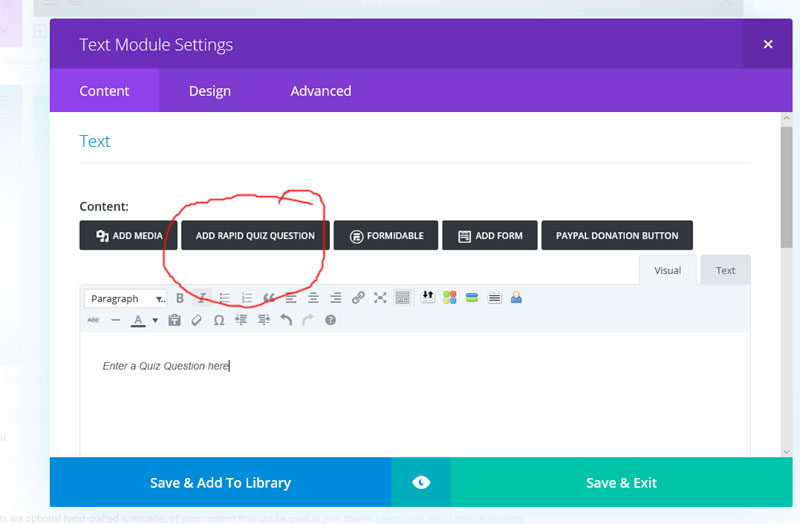
NOTE: Gunjan, to see how the questions are currently entered through the “Rapid Quiz” plugin, please notice that you can add a question to a page clicking on the “Add Rapid Quiz Question” option when entering text using the Text Module Section:
GOOGLE ANALYTICS:
I have set up a Google Analytics Account to eventually track site usage.
MAILCHIMP:
I have set up a MailChimp account and will be using MailChimp for group correspondence (ie sports officials, coaches, players, Rules Interpreters, Instructors, Contributors, etc)
PAID MEMBERSHIPS PRO:
After reviewing a number of Membership Plugins, I downloaded and activated Paid Memberships Pro to see if it will work to control membership functions. I do not like how it uses the basic WordPress login screen for logging in, but I figure there is a way to get around that. I will need your input as to whether we should use this plugin, some other plugin, or whether it is best for you to code it.
GOOGLE ANALYTICS:
I have set up a Google Analytics account to handle tracking usage.
PayPal:
I plan to use PayPal to receive donations to support the site.
Databases:
User Account Table :
We will need a table in the database for user account info. It will need (at least) the following fields:
- Username
- Password
- Email address
- First Name
- Last Name
- Address (street)
- City
- State
- Zipcode
- Phone #
- Subscription Type
- Basic Level Subscription – For all subscribers who are not trainers
- Training Level Subscription – For anyone who trains sports officials
- Groups (this field will be used mainly for group correspondence using MailChimp) (can be multiple selections)
- Sports Official
- Rules Interpreter / Instructor
- Coach
- Player
- Fan
- Start Date (subscription start date)
- End Date (subscription end date)
- User Notes (This text area field is used by the user to explain his/her connection to the sport(s)NOTE: Fields below are not to be show up on the user’s account, only the Admin account
- Account Status
- Inactive
- Active
- Contributor (number of published questions)
- Last donation date
- Rule Reviewer? (dropdown – list of sports-ruling org) (can be a Reviewer for multiple sports) ( admin maintained only)
- Administrator Notes (this text area field is to be seen by the administrator only)
Questions (Game Situations) Table:
A table will be needed to store the questions & answers that will be submitted to the site by registered users and used to create review questions and quiz questions.
It will need (at least) the following fields:
- Question ID# (ie 00005, 20111, etc) (sequence generated?)
- Sport – Ruling Org (ie NFHS Fastpitch, NCAA Baseball, NCAA Basketball, etc)
- Question (text area – 5 rows X 70 characters)
- Correct Answer (text area – 3 rows X 70 characters)
- Incorrect Answer 1 (text area – 3 rows X 70 characters)
- Incorrect Answer 2 (text area – 3 rows X 70 characters)
- Incorrect Answer 3 (text area – 3 rows X 70 characters)
- Explanation Detail (text area – 5 rows X 70 characters)
- Rule Number (Dropdown) (ie Rule # 1 Field and Equipment) (each sport/ruling org will need to have their own dropdown fields)
- Comments to Reviewer (text area – 5 rows X 70 characters)We will also need the following non-viewable fields :
- Status
- Inactive
- Active
- Publish Date
- Submitted by: (this will need to link to the name and state of the user who submitted it) (ie “Bob S, Ohio” or “Tommy D, Michigan”)
Rule # Table
NOTE Each sport can have multiple Ruling Organizations (ie Fastpitch Softball has NCAA Fastpitch Rules, Fastpitch Softball also has NFHS Fastpitch Rules, etc)
Also, each ruling organization has a set of 10 or more Rule#s (ie NCAA Fastpitch – Rule #1 – Field and Equipment)
I will need to enter these rule #s and Titles into this Rule Table, so they can be used (in a dropdown) so anyone submitting a question can select a rule number / title for each question.
This Table will need to have at least the following fields:
- Sport – Ruling Org (ie Fastpitch – NCAA, or Basketball – NFHS)
- Rule Number and Title (ie “Rule # 1 – Field and Equipment”, “Rule #3 – Players, Substitutes and Coaches”)
Gunjan, I am sure there will be other tables & fields that you will need, but this should give you an idea of what is needed. Let me know if you have questions.
IDEAS FOR THE FUTURE
Mobile version:
In the future, I would like to work on a “stripped down” mobile version (maybe an app) that would ONLY allow the user to study the quizzes using the mobile phone (not being able to submit questions, editing your account, etc).
Interactive group quizzes using IPhones:
This would work like the free app, Kahoot! (www.kahoot.com), allowing trainers to give interactive quizzes (using our questions) during class or association meetings.
A Question A Day!
Allow users to upgrade their subscription to receive a few questions each day by email, (for a small fee).
Let’s get started:
OK, Gunjan. Hopefully, you get an idea as to what I am trying to achieve with this site. There is nothing out there like it ! With this in mind, I would like you to get the tables created and set up the “Registration Form” and “Rule Submission Form” so I can have a few of my friends (who are rules instructors) “sign up” (Trainer Level Subscription) and start to enter some of their favorite questions (game situations). If we can get some questions into the database and then come up with a way to display them “to create quizzes” and “interactive online review questions”, we can make modifications to the process once we see how it is working. I wanted to give you a good overall knowledge of the site before you got started developing.
A couple of my friends are Instructors and will be starting new umpire classes at the end of January. I am hoping we can be ready to allow them to enter questions and then to select and print questions for their classes, to show them how much it will help them train others. Do you think that is possible?
Dave